
The biggest shift AI has brought to design isn’t that designers can now write production code. It’s that we can finally generate evidence before committing to anything.
There’s a lot of conversation about AI affecting production: designers pushing code and shipping something closer to the final product. That matters. But the bigger opportunity is even earlier: exploring a design space before anything gets built. Not prototypes that demonstrate a decision, but prototypes that stress-test one, built to find where a solution breaks.
From Theory to Practice
In data visualization, building parametrized tools to explore a design space is standard practice. In product design, it rarely happens. Static mocks show what something looks like, not how it behaves across a distribution of real inputs. While engineers could build a throwaway prototype, they usually don’t. Their incentives are toward scale and production quality, not disposable experiments.
AI-assisted coding is changing this. Before, exploration like this was possible in theory but rarely happened in practice. Now it only takes a couple of days, so it actually gets done.
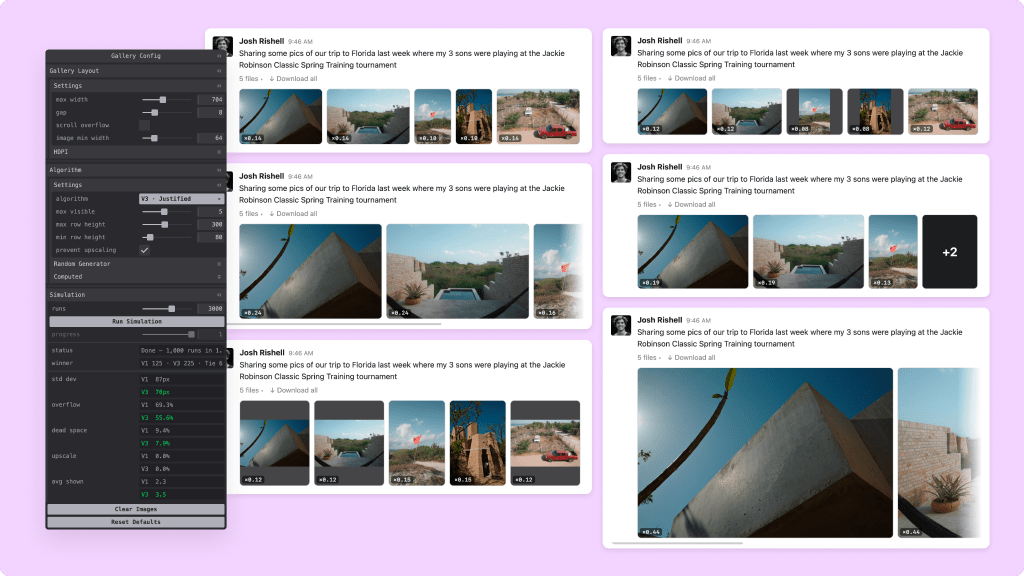
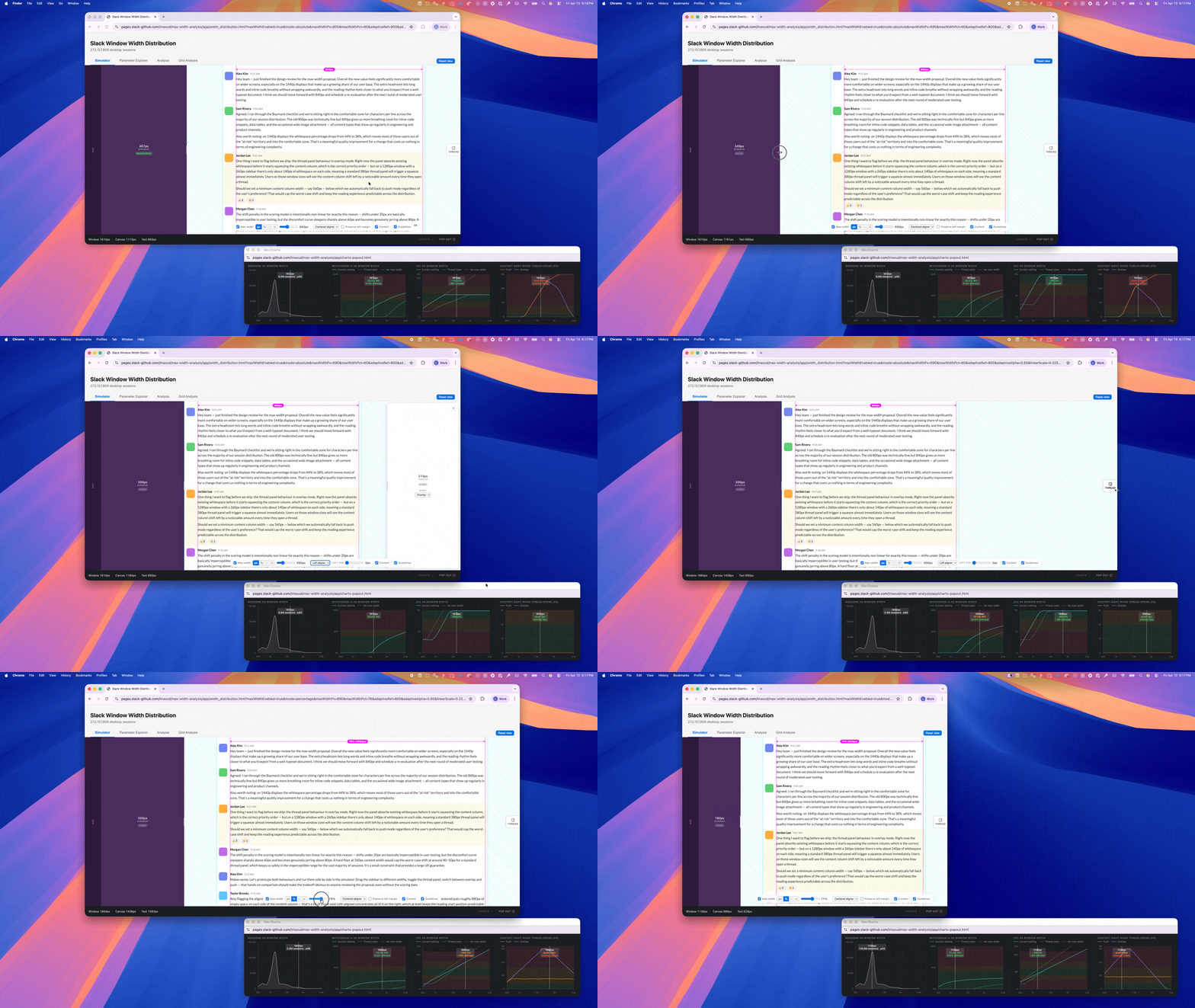
At Slack, I applied this thinking across several recent projects. Two examples: an interactive prototype comparing gallery layout algorithms, and a max-width strategy tested against 272 million desktop sessions.
From Mockups to Tools
The typical prototype represents a decision that’s already been made, built to demonstrate it. These prototypes work the other way: built when the decision is still open, generating distributions rather than single examples.
For the gallery layout, I put three algorithms side by side with interactive controls for tuning parameters. For the max-width explorer, I modeled Slack’s full window geometry and swept across four max-width strategies, seeing how each one projected across our actual screen-size distribution and where users land in comfortable versus problematic whitespace.
Neither was built to ship. A few days of building replaced weeks of production iteration, surfacing edge cases invisible in Figma, and showing max-width behavior across every real screen size, not just a handful of breakpoints. The question shifted from “Which option looks right in this one comp?” to “Which option holds up everywhere?”
Escalating Evidence
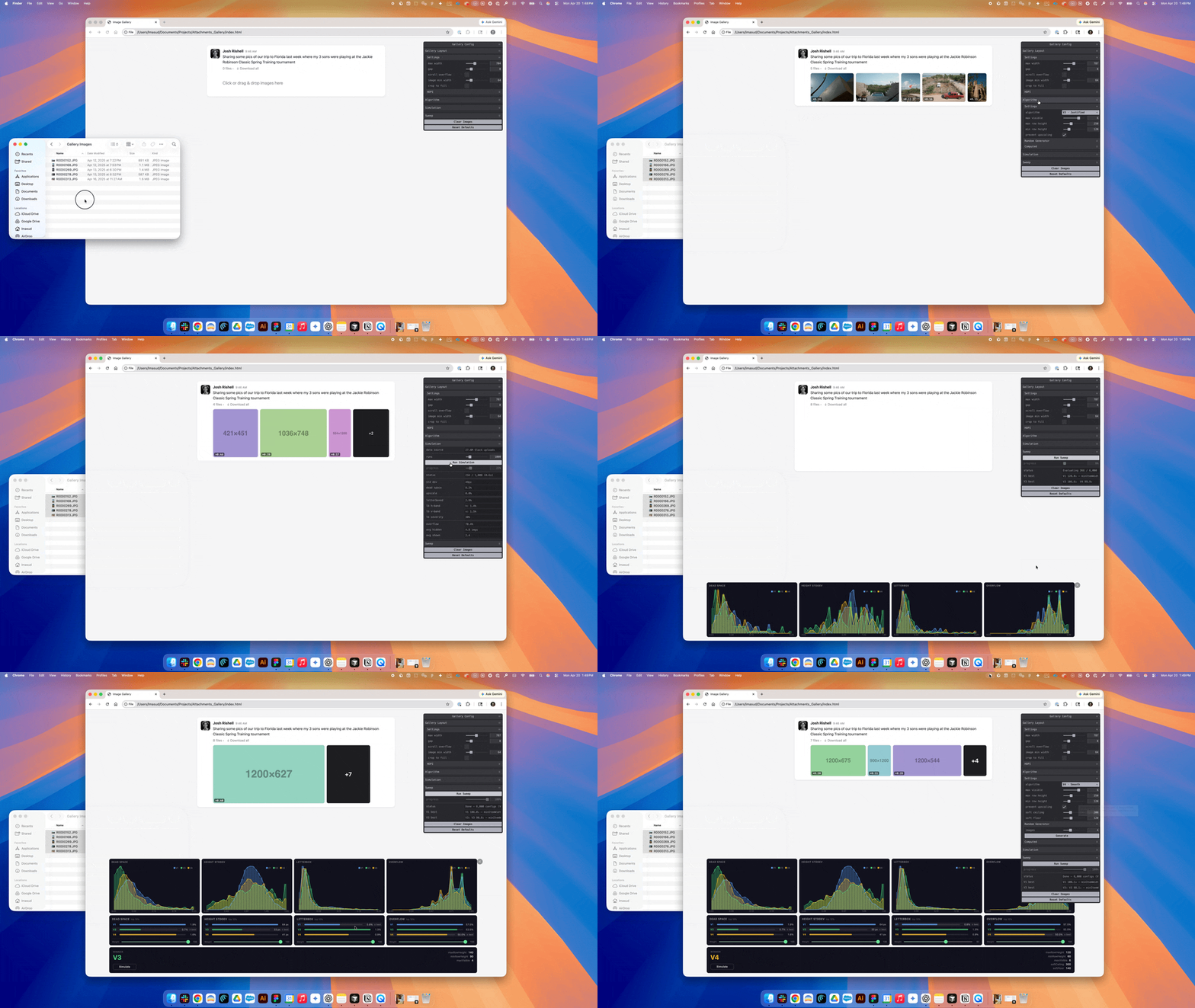
Once the prototype existed, the question changed from “Which layout is better?” to “How much of the system can I actually see?” For the gallery, what followed looks like iteration, but it’s really a progression in evidence:
- Manual testing: I uploaded real images and evaluated the results by eye. This approach was limited to whatever images I happened to have on hand, with no way to know what edge cases I was missing.
- Distribution-based generation: I generated images matching the actual aspect ratio distribution from real Slack uploads. This made it possible to see where the layout broke for specific image shapes, not just the ones that happened to be on my desktop.
- Monte Carlo simulation: I ran thousands of simulations measuring specific metrics — letterbox rate, dead space, and overflow — to understand how an algorithm actually behaves at population scale.
- Configuration sweep: I ran simulations across hundreds of parameter combinations and across algorithms, mapping the strengths and weaknesses of each approach and making the tradeoffs between them legible.
Each step didn’t just make things faster. It made the system more legible. From a few cases, to distributions, to the full space of tradeoffs.
One caveat: collapsing multiple dimensions into a single score is harder than it sounds. For max-width, I scored hundreds of thousands of configurations. The numbers were precise, but the assumptions weren’t. The goal isn’t a single answer. It’s to expose the shape of the tradeoffs so the team can reason about them.
None of this required feature flags, staged rollouts, or user traffic. By the time I committed to a direction, the uncertainty had already been resolved somewhere it was cheap to be wrong. The output isn’t a visual spec. It’s constraints. Something engineering can implement however they want, because the reasoning is already resolved upstream.
And when I brought the work to stakeholders, I wasn’t defending a recommendation. I was showing something they could explore. Questions that would normally stall a review already had answers.
Beyond Layout
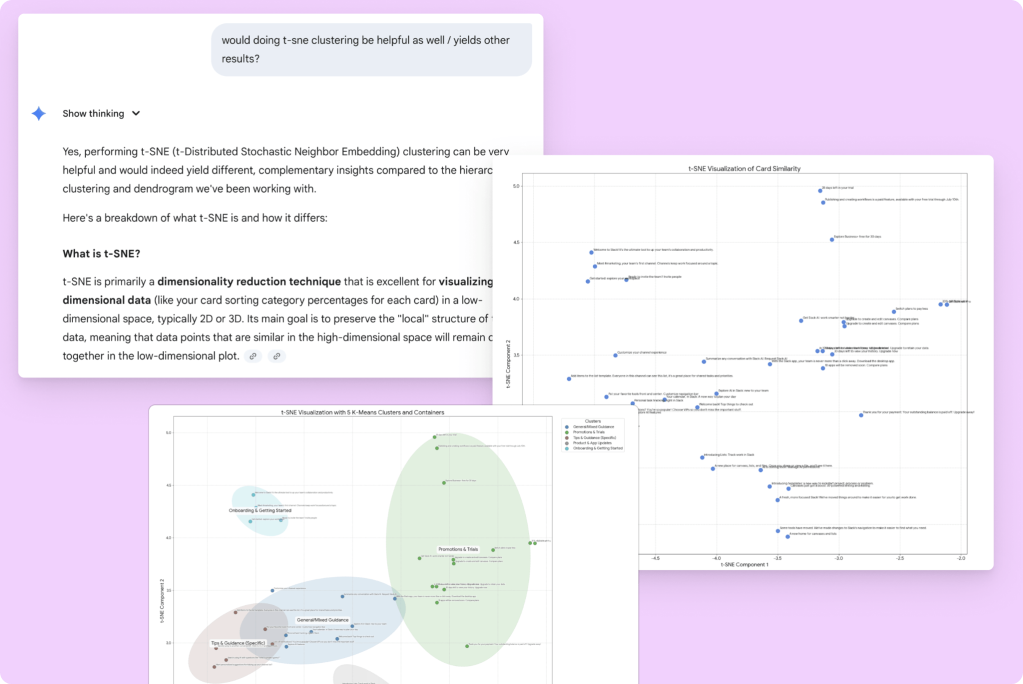
The same approach extends beyond layout. For Slack’s notification system, I used AI to run card sorting analysis that revealed how hundreds of notifications naturally cluster, replacing debate with observable structure. A color audit comparing palettes against a perceptual reference surfaced inconsistencies invisible in isolation. In both cases, the value was making the system directly explorable.
When redesigning Slack’s notification system, the problem wasn’t UI, it was categorization. How do you organize hundreds of notifications into groups that make sense to users? Categories feel obvious until you test them. I used AI to run card sorting analysis (similarity matrices, clustering, dimensionality reduction) that normally requires a quantitative researcher. My role was deciding what to test and how to interpret it. Instead of debating categories, we could observe how they emerged from the data.
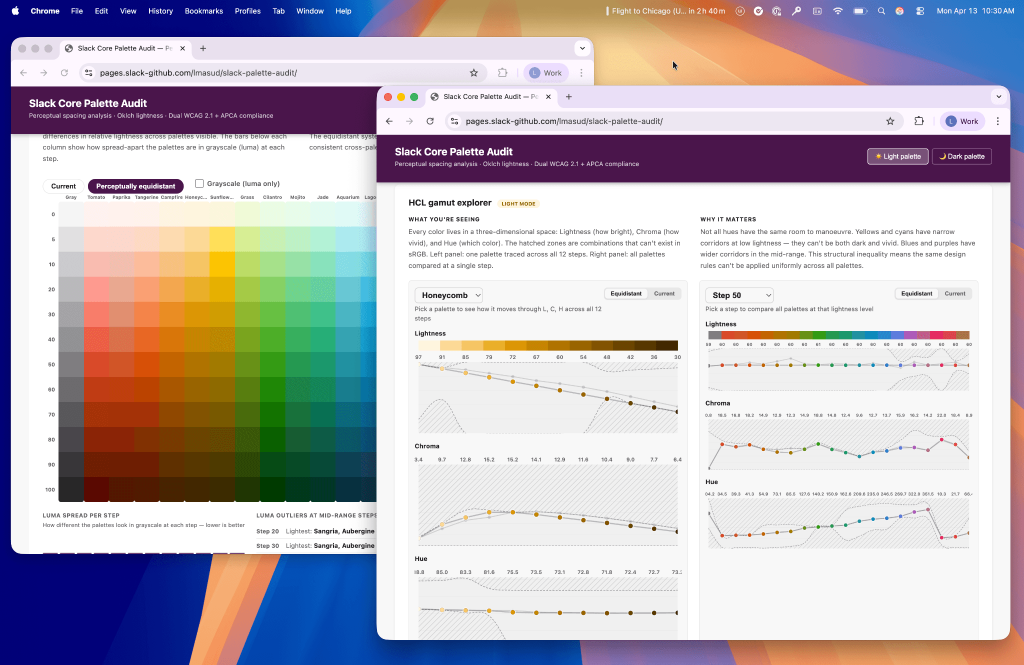
Slack’s color system posed a similar challenge. Over time, palettes evolve and designers reason about them locally, but perception is non-linear and system-wide. A two-hour audit comparing palettes against a perceptually uniform reference revealed inconsistencies invisible in isolation, sparking a 30+ reply thread across design and engineering. In both cases, the value wasn’t the output. It was making the system directly explorable.
Looking Forward
There’s a lot of noise right now about what AI means for designers. The process itself hasn’t changed: explore the solution space, understand the tradeoffs, help your team pick. What’s changed is that the tools finally match the speed the job always demanded.
The real shift is in posture. Instead of advocating for a solution, you try to break it first. If it holds up, you commit with confidence. If it doesn’t, you find out somewhere it’s cheap to be wrong, before anyone writes production code, before a review stalls on a question no one can answer from a mockup.
That’s what I’m pushing my team toward: stress-testing decisions with fewer dependencies, more evidence, and less guesswork.
Luca Masud is a Senior Director of Product Design at Slack, leading the Messaging Experience team. The prototypes and analyses in this post were all built hands-on.